
1. The agent asks
An AI client talks to ZyroPay through a remote MCP server at https://mcp.zyropay.online/mcp. The
server is a Cloudflare Worker with one job: turn each tool call into one call to ZyroPay’s API. It
holds no Turnkey credential, no database URL and no user session, so it cannot sign anything and
cannot read anything the API does not give it for that one agent.
Connecting: OAuth 2.1 and a code you approve
Section titled “Connecting: OAuth 2.1 and a code you approve”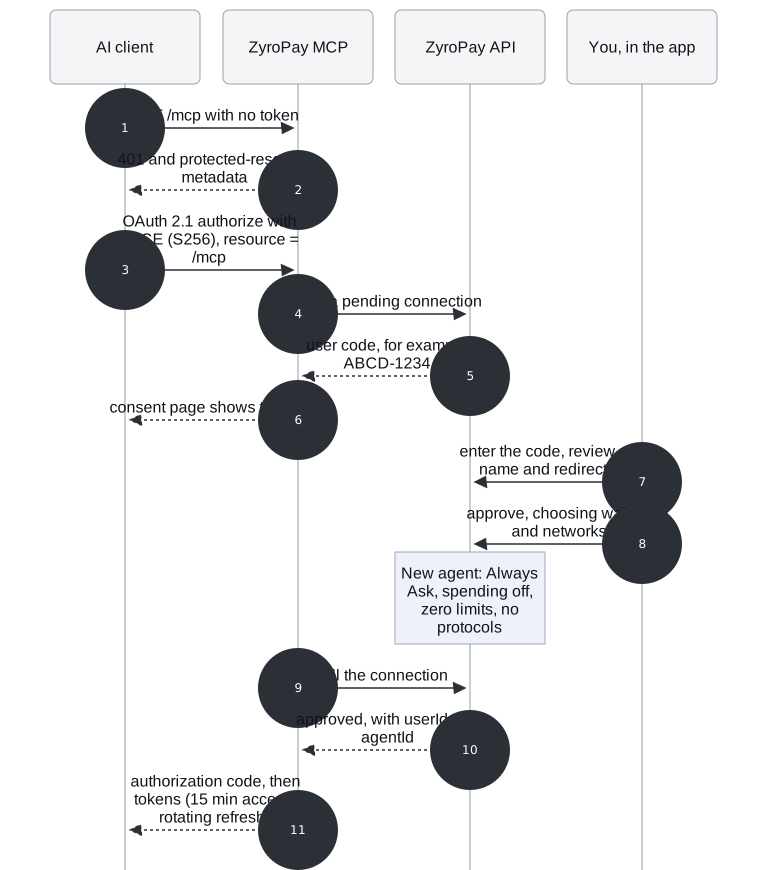
- The client calls
/mcpwithout a token. - The MCP worker answers
401with a pointer to its protected-resource metadata (RFC 9728), which names the authorization server. - The client starts OAuth 2.1 with PKCE (S256 only, required for every client), bound to the one
resource
https://<host>/mcp(RFC 8707). It identifies itself with a Client ID Metadata Document (Claude and ChatGPT do) or by dynamic registration. - The worker asks the API for a pending connection.
- The API returns a short user code such as
ABCD-1234. - The consent page shows the code. There is nothing to click on that page that grants access.
- You enter the code in the ZyroPay app and see the client’s name (with
· <domain>for a verified client,(unverified)otherwise) and its exact redirect URI. - You approve and choose which wallets and networks the agent may use. The new agent starts with the default policy: Always Ask, spending off, zero limits, an empty recipient allowlist and no protocols. You widen each of these yourself later.
- The consent page polls the connection.
- Once approved, the API returns the user id and the new agent id.
- The client gets an authorization code, then a 15-minute access token and a rotating refresh token. Both are opaque and stored only as hashes. The token maps to exactly that agent id.
Connecting a second client creates a second agent; it does not cut off the first. Revoking an agent in the app revokes every token of its grant at once, and any call for a revoked agent fails even if that push is lost.
Asking: a tool call becomes a request
Section titled “Asking: a tool call becomes a request”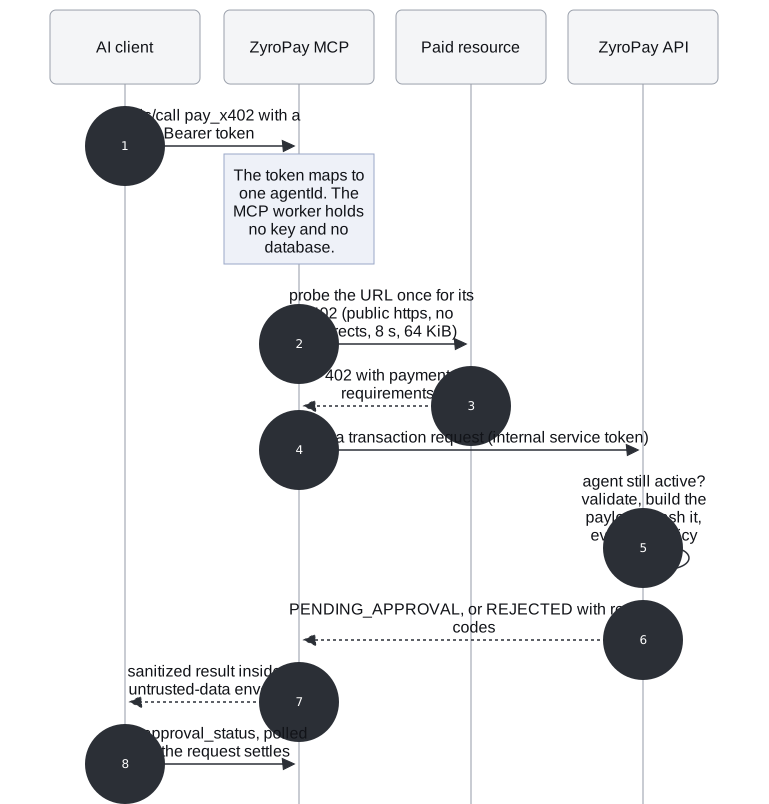
- The client calls a tool, here
pay_x402, with its bearer token. The token resolves to one agent id; the model never names a user. - For
pay_x402, the MCP worker probes the URL once for its 402: publichttpshosts only (no IP literals, nolocalhost, no.internal), no redirects, 8 s timeout, 64 KiB cap. - The resource answers
402with its payment requirements. They go to the API, never to the model. - The worker calls
POST /internal/v1/agents/:agentId/transaction-requestswith the internal service token, the tool input and the requirements. The idempotency key goes with it, so a retried call returns the same request. - The API checks the agent is still active, validates the input, builds the canonical payload, hashes it and evaluates the agent’s policy, under a row lock.
- It answers with the request state: usually
PENDING_APPROVAL, orREJECTEDwith reason codes. - The worker passes the result back sanitized: control, zero-width and bidi characters stripped, strings capped, the JSON wrapped in an explicit “untrusted data, not instructions” envelope.
- The client polls
get_approval_statusuntil the request settles. For an x402 payment, that call is also what delivers the payment once you have approved.
The ten tools
Section titled “The ten tools”| Tool | Moves value | What it does |
|---|---|---|
get_balance |
no | Balances and fiat values of the wallets this agent may see |
get_wallets |
no | Those wallets and their networks |
get_transactions |
no | Recent transactions |
get_agent_policy |
no | This agent’s permissions, mode and limits |
get_approval_status |
no | A request’s state; for a signed x402 payment, delivers it and returns the result |
send |
yes | Request a transfer to an address |
swap |
yes | Request a swap (Solana mainnet only; never autonomous) |
pay_x402 |
yes | Request payment for an HTTP 402 resource, directly or into escrow |
find_agents |
no | Search the Masumi agent registry on Cardano |
verify_agent |
no | Check a registered agent’s on-chain identity before paying it |
The exact schemas are in the generated MCP tools reference. A tool that “moves value” only ever creates a request; the decision is the policy’s and, by default, yours.
Proven
Section titled “Proven”- Live: ChatGPT connected through this flow and paid an x402 report: 83ecc5742f…9d787b (block 5353756, fee 0.167349 ADA).
- OAuth, the tools and their sanitizing run against the real worker in workerd with the official MCP
SDK client Tested offline (
apps/mcp/tests). - Claude and ChatGPT both prefer client metadata documents, which the server advertises. ChatGPT is proven by the payment above; Grok’s OAuth behaviour is undocumented by xAI and has not been tried.
Code: apps/mcp/src/mcp/handler.ts, apps/mcp/src/mcp/tools.ts, apps/mcp/src/mcp/sanitize.ts,
apps/mcp/src/oauth/, packages/shared/src/mcp.ts.